
A contact form becomes much more useful when the data flow is explicit. This implementation validates inquiries at the edge, stores each accepted lead as a private JSON record, rebuilds a CSV dataset automatically, sends a best-effort email notification, and only emits analytics after consent.
A contact form looks like a small feature until you ask what should happen after someone clicks Submit.
For my personal website, I did not want the form to disappear into a generic inbox with no structure. I wanted a small pipeline that could accept an inquiry, validate it, keep a private record, notify me quickly, and still leave room for later analysis.
The result is deliberately modest. It is not a CRM and it is not meant to imitate one. It is a low-volume, transparent workflow built around the needs of a personal professional website.
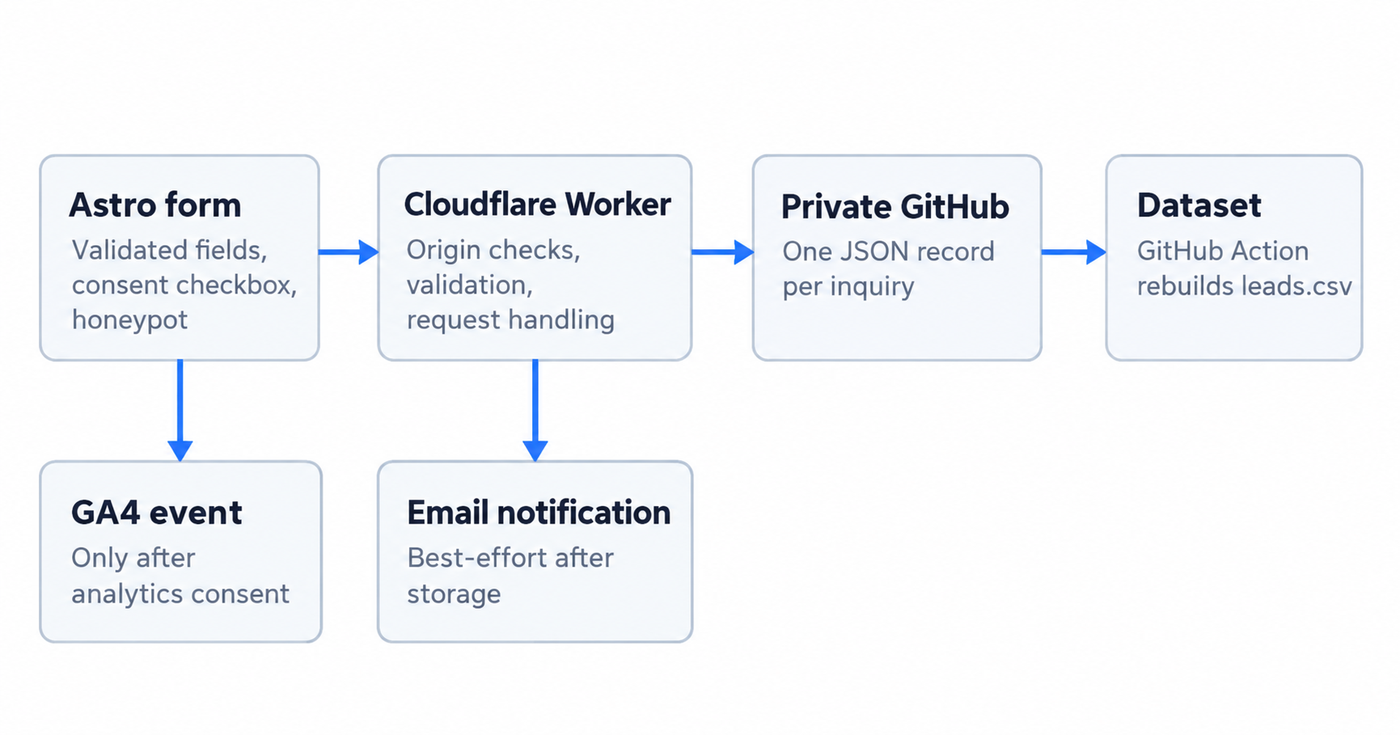
The flow
The current flow is:
- A visitor submits the bilingual Astro form.
- The frontend sends a JSON payload to a Cloudflare Worker.
- The Worker checks the request origin, payload shape, required fields and a honeypot field.
- A valid inquiry is written to a private GitHub repository as one JSON file.
- A GitHub Actions workflow rebuilds an aggregate
leads.csv. - After storage succeeds, the Worker attempts to send me an email notification.
- If analytics consent has already been granted, the frontend also sends a GA4
lead_form_submitevent.
The important design choice is the order: storage first, notification second. An email failure should not turn a successfully submitted inquiry into lost data.
Why I used a Worker between the form and storage
I did not want a browser form to know anything about storage credentials. The frontend only knows a public Worker endpoint. Secrets such as the GitHub token stay in the Worker environment.
The Worker also creates a useful trust boundary. It rejects unsupported methods, checks the request origin, requires JSON, limits payload size, validates the required fields, and normalizes the data before it is stored.
The public implementation is available in the website repository under infrastructure/lead-worker/worker.js.
This does not make the endpoint magically secure. It simply keeps validation and privileged operations on the server side instead of embedding them in client code.
GitHub as a small append-oriented store
For this use case, each accepted inquiry becomes a separate JSON file using a date-based path:
leads/YYYY/MM/DD/<timestamp>_<uuid>.jsonThe Worker uses GitHub’s repository contents API to create that file. GitHub’s documentation requires file content to be Base64-encoded for this endpoint, which the Worker handles before sending the request.
I like this structure for a personal site because every stored inquiry is explicit and auditable, and the raw records remain separate from the derived dataset.
But there is an important boundary here: a Git repository is not a general-purpose transactional database. GitHub’s own documentation notes conflict considerations around concurrent content operations. If this form grew into a high-volume lead system, I would move persistence to a database or purpose-built datastore and keep GitHub for code and deployment artifacts.
Turning JSON records into a usable dataset
Raw JSON files are convenient for append-oriented storage, but a single table is easier for quick analysis.
A GitHub Actions workflow runs whenever a new lead JSON file is added. A small Python script reads the records and rebuilds leads.csv with fields such as:
- submission time,
- language,
- service interest,
- project stage,
- timeline,
- organization,
- message,
- and consent state.
This keeps the raw records as the source of truth while producing a lightweight analytical view automatically.
The private repository stays private because the data includes information submitted by real people. The public website repository contains the architecture and Worker code, not the lead records.
Email is a notification, not the database
After GitHub confirms that a lead has been stored, the Worker sends a notification to my verified email destination.
The email includes the reference code and the useful lead context, and its Reply-To points to the email address submitted by the visitor. That makes the operational loop simple: I can read the notification and reply directly.
The notification step is intentionally best-effort. If email delivery fails, the Worker logs the failure but still returns success for the already-stored lead. This is a small reliability decision, but it matters: a secondary channel should not invalidate primary persistence.
Consent-aware analytics
I also wanted to measure whether the collaboration page is useful without loading analytics before a visitor has made a choice.
The site initializes analytics storage as denied. The Google tag is only loaded after analytics consent has been granted. On a successful form submission, and only when that consent already exists, the frontend emits a custom event:
lead_form_submitwith parameters for service interest, lead stage, form language and page path.
Google’s consent-mode guidance distinguishes between setting a default consent state and updating it after the user’s choice. Keeping that flow explicit made it easier to reason about what is sent and when.
Analytics and lead storage are separate concerns: declining analytics does not prevent someone from submitting the collaboration form.
A few privacy and abuse controls
The form is intentionally narrow. It collects information needed to understand and respond to an inquiry, not a broad profile.
The current implementation also includes:
- an explicit consent checkbox,
- a privacy notice linked next to the form,
- a honeypot field for simple bot filtering,
- an origin allowlist at the Worker,
- server-side field length limits and validation,
- no request IP stored in the lead record,
- private storage for submitted leads,
- and analytics that remain off until consent.
A honeypot is not a full anti-abuse strategy. If automated spam becomes a real problem, a challenge mechanism such as Turnstile would be a reasonable next layer. I prefer adding that complexity in response to an observed problem rather than by default.
What I would change at a larger scale
This architecture fits a personal site because the expected volume is small and the workflow is easy to inspect. At larger scale, I would separate responsibilities further:
- persist leads in a database with appropriate access controls and retention rules,
- use a queue for asynchronous notification work,
- add rate limiting and stronger abuse protection,
- add monitoring and retry policies,
- connect the pipeline to a CRM when lead volume justifies it,
- and formalize deletion and retention workflows.
The interesting part of this project was not choosing the most sophisticated stack. It was choosing a stack whose failure modes I could understand.
For a small system, clarity is a feature.